
Before Capo, our group tracked stats in a Google Sheet for over a decade — every match since January 2011, 736 games and counting. The stats system below is that spreadsheet rebuilt properly: everything it did, minus the person who had to update it every Thursday night. Here's what gets recorded, how the numbers work, and when they update.
What gets tracked
Every time you complete a match, Capo records:
- •Games played — Total appearances
- •Wins, draws, losses — Match results for each player
- •Goals scored — Individual goal tally
- •Own goals — Tracked separately (don't count towards your total)
- •Clean sheets — Games where your team didn't concede
- •Fantasy points — Points for wins, draws, and goals
- •Which team you played on — Orange/Green assignment
- •Goalkeeper games — If you played in goal
Calculated statistics
From the raw data, Capo calculates:
- •Win rate — Percentage of games won
- •Goals per game — Average scoring rate
- •Minutes per goal — How long between goals (based on match duration in settings)
- •Points per game — Average fantasy points
- •Form — Results from last 5 matches (W/D/L)
- •Streaks — Current winning/losing/scoring runs
Leaderboards
The Stats section has four tabs: Half Season, Season, All Time (which holds the Leaderboard, Feats and Legends views) and TOTS — the Team of the Season, covered below. Between them you get:
- •Half-season — Current half of the season, with a dropdown to browse past halves
- •Full season — The entire season so far
- •All-time — Career totals since you started using Capo
- •Goal leaders — Top scorers
- •Season race — Graph showing points accumulated over time
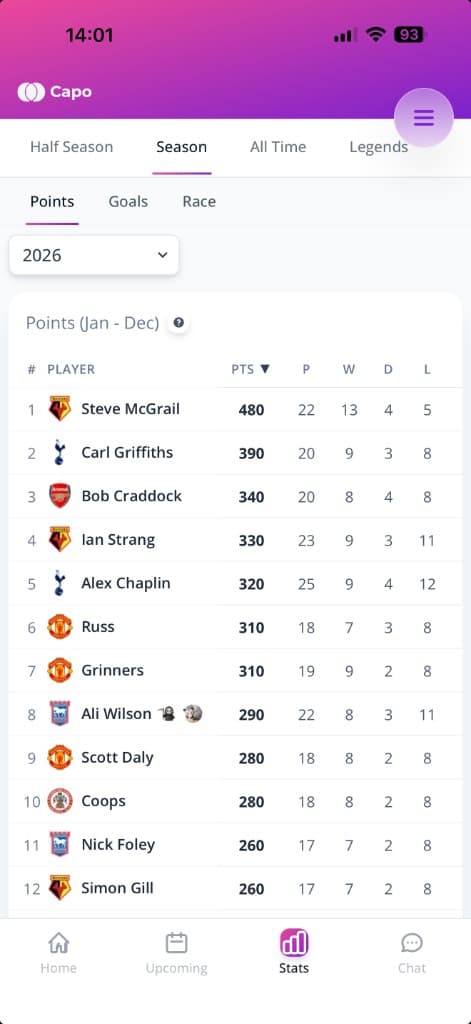
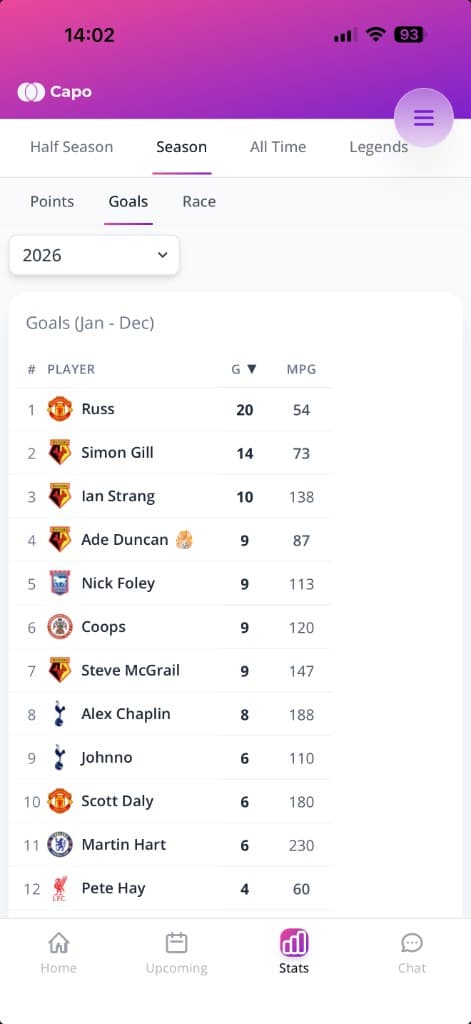
You can browse previous seasons using the year dropdown on the Season tab, and previous half-seasons using the period dropdown on the Half Season tab — so you can look back at who won the first half or any earlier year.
Tip
Personal dashboard
Every player has their own stats page showing:
- •Personal bests — Highest scoring game, longest streak, etc.
- •Milestones — Every 5 games, every 10 goals, etc.
- •Recent form — Last 5 matches with results
- •Career summary — All-time totals
- •Teammate chemistry — Who you win most with
Feats (all-time records)
The Feats view (under All Time) shows all-time records for your group:
- •Most goals in a game — Who scored the most in a single match
- •Longest unbeaten streak — Most consecutive games without a loss
- •Longest winning streak — Most wins in a row
- •Longest goal streak — Most consecutive games with at least one goal
If someone breaks a record, it'll appear in the match report too — so the whole group sees it.
Legends (Hall of Fame)
The Legends view (also under All Time) records the season champions and runners-up for both the points table and the goals table. This is your group's all-time honour roll — who won the title each year.
The minimum number of games needed to qualify for the Hall of Fame tables is configurable in Settings (useful if your group has players with hundreds of games and you want to keep the tables meaningful).
Team of the Season (TOTS)
The TOTS tab in Stats picks a best XI for the period — the debate-starter our own group argues about all week. It updates live through the season, so the current period is labelled Team of the Season so far, and the period dropdown lets you flick back through past half-seasons and full seasons.
Each line of the team is picked by the metric that matches its job:
- •Attack — most goals in the period
- •Midfield — most fantasy points
- •Defence — fewest goals conceded per game
- •Keeper — only shown when someone has played enough games in goal; most groups have no fixed keeper, so usually there's no keeper slot at all
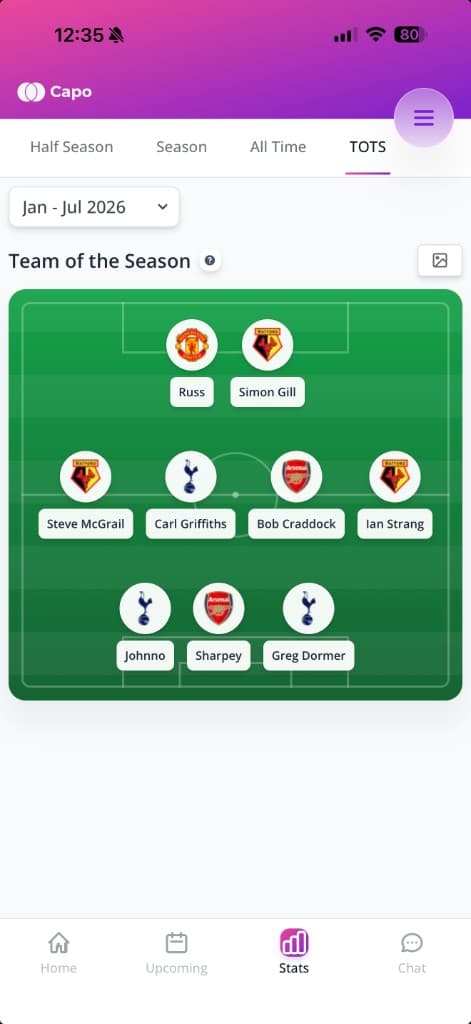
Players need enough games in the period to qualify — roughly a quarter of the period's matches, with a minimum of five. Tap the ? icon on the page to see the exact selection rules, and use the share button to save the XI as an image for the group chat.
Picked by the numbers
Season Wrapped
When a half-season or season ends, every player gets a personal Wrapped — a recap of their period told as tappable story slides, the same way music apps do year-end reviews. Yours covers:
- •Your numbers — games, goals, points, win % and where you finished in the table
- •Best month — the calendar month where you racked up the most points
- •Best teammate — who you won most with over the period
- •Nemesis — the opponent who had your number
- •Team of the Season — the full XI, and whether you made it
You'll get an email when a season wraps up, and a banner appears on your dashboard while your Wrapped is fresh. Every slide has a share button that turns it into a card for the group chat. You need to have played a few games in the period for the full recap — otherwise you get a lighter version.
Compare two players (head-to-head)
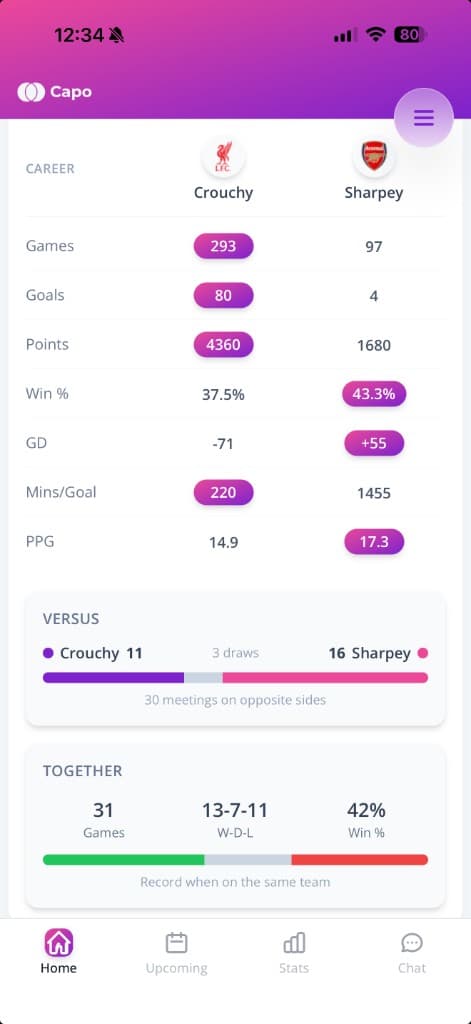
Settle the argument properly: open any player's profile and hit COMPARE (it pre-loads the two of you when you're viewing someone else's profile), or use the Compare screen linked from the stats pages. Pick any two players and you get:
- •Career stats side by side — games, goals, points, win %, goal difference, minutes per goal and points per game, with the better value highlighted
- •Versus — the win-draw-loss record when the two of you were on opposite teams
- •Together — your record when you played on the same team
Rivals: Nemesis & Favourite Opponent
Every player profile has a Rivals section showing two opponents:
- •Nemesis — the opponent you beat least often. The one who always seems to end up on the winning side against you.
- •Favourite Opponent — the one you beat most often. Long may they keep turning up.
Only opponents you've faced at least ten times count, so a lucky one-off doesn't crown a nemesis. Tap either card for a top-10 list with the full win-draw-loss record against each rival.
Trophy Cabinet
The Trophy Cabinet on each player's profile collects their career honours in one place:
- •Match awards — career tallies of Man of the Match, Donkey of the Day and Missing in Action
- •Monthly honours — Player of the Month and Goalscorer of the Month counts
- •Season honours — season titles won and top scorer titles
It only appears once a player has actually won something — empty cabinets stay hidden. Match awards come from your group's voting; see Voting & Awards in the related articles below for how those work.
When stats update
Stats update automatically through several triggers:
- •Match completion — As soon as you save the result, stats start updating
- •Background job — Takes about 5 seconds to crunch the numbers
- •Nightly refresh — Everything recalculates at 2am just in case
- •Manual trigger — Admins can force an update from Settings → Update Stats
Stats not showing?
Fantasy points explained
Fantasy points are the main leaderboard currency. All values are configurable in Settings — these are the defaults:
- •Win — 20 points (default)
- •Draw — 10 points (default)
- •Loss — -10 points (default)
- •Attendance — 10 points just for turning up (default)
So with defaults, a typical win nets you 30 points (20 + 10 attendance), while a loss still gets you 0 (the attendance bonus cancels out the penalty). This keeps everyone motivated to play rather than sitting out to protect a lead.
Bonus points
Extra points for dominant performances (all configurable):
- •Clean sheet win — 30 points default (instead of 20)
- •Clean sheet draw — 20 points default (instead of 10)
- •Heavy win — 30 points default (win by 4+ goals)
- •Heavy win + clean sheet — 40 points default (the jackpot)
Heavy loss penalty
Lose by 4+ goals and you're looking at -20 points instead of -10 by default. This keeps games competitive even when you're behind — there's always something to play for. The goal margin threshold and penalty are both configurable.
Goals scored
By default, goals don't earn extra points. Why? Because it encourages goal-hanging and selfish play. Scorers already have the goals leaderboard to chase — the fantasy table rewards team results. You can turn this on in Settings if your group wants to reward individual scorers.
What happens when players are tied?
If two or more players finish on the same fantasy points, positions are decided by:
- •1. Team goal difference — The total of your team's goals scored minus goals conceded across all your matches. This rewards being part of dominant team performances without encouraging selfish play.
- •2. Games played — More games = higher rank. Sustaining the same points tally over more matches shows consistency and commitment.
- •3. Alphabetical — In the extremely unlikely event everything else is equal.
This applies everywhere — half-season, full season, all-time standings, the race graph, and season honours.
Power Rating & Goal Threat
These two stats appear on player profiles and drive the Performance balancing algorithm. They're calculated automatically from your match history — no setup needed.
Power Rating
Your average fantasy points per game, weighted so recent matches count more than older ones. A player winning regularly in the last few weeks will have a higher Power Rating than someone whose good form was six months ago.
Goal Threat
Your average goals per game, again weighted toward recent form. Bang in a few this month and it goes up. Go a few weeks without scoring and it drifts down — but slowly.
How the weighting works
Capo uses an exponential decay formula: a game played today counts fully, a game from two years ago counts roughly half as much, a game from four years ago roughly a quarter. Your full history still matters — it just matters less as time passes.
Tip
New players & qualification
Until a player has played around 5 games, their rating is pulled toward the group average — so brand new players don't start at 0% or 100%. After that, their actual stats take over.
Goalkeeper games don't count