
Tired of chasing people on WhatsApp every week? RSVP mode lets players book their own spot through the app. You can even go fully hands-off with Auto-Pilot — and pick how booking works: Everyone at once, Regulars first, or Squad and subs.
The three booking modes
Manual (default)
You manage everything yourself. Add players to the pool, balance teams, share when ready. This gives you full control but means more work.
RSVP
Players book their own spot by tapping a link. You still balance and release teams when you're ready. Best of both worlds — less chasing, but you keep control of when teams go out.
Auto-Pilot
Full hands-off mode. Players book, and when the match is full, Capo automatically balances teams and sends them out. You don't need to do anything unless there's a problem.
Tip
How RSVP booking works
Create a match
Players get notified
Players book in
Watch the pool fill
Balance and send
The waitlist
When the match is full, new bookings go to the waitlist. If someone drops out, the next person is offered their spot automatically.
On Everyone at once and Regulars first, waitlisted players see their position ("3rd on waitlist") and get notified when they're promoted. Under Squad and subs they see "You've put your name down" — the waitlist is ranked by games played, not queue position.
How booking works at your club
Setup → Matches asks one question: how does booking work? Pick a card — that's the whole setup. Advanced under the card only shows the knobs that apply.
- •Everyone at once — Booking opens for everyone when you create the match. Set Booking opens to At a set time… and it stays closed until then. First come, first served once it's open. Right for most casual groups.
- •Regulars first — Your regulars get a head start, then semi-regulars, then everyone else. Anyone can book once it's their turn. Set how many hours later each group can book on the Regulars first card.
- •Squad and subs — Only your squad books a spot. When a spot is free, subs are called one person per empty spot — most games played first — and tap to claim it.
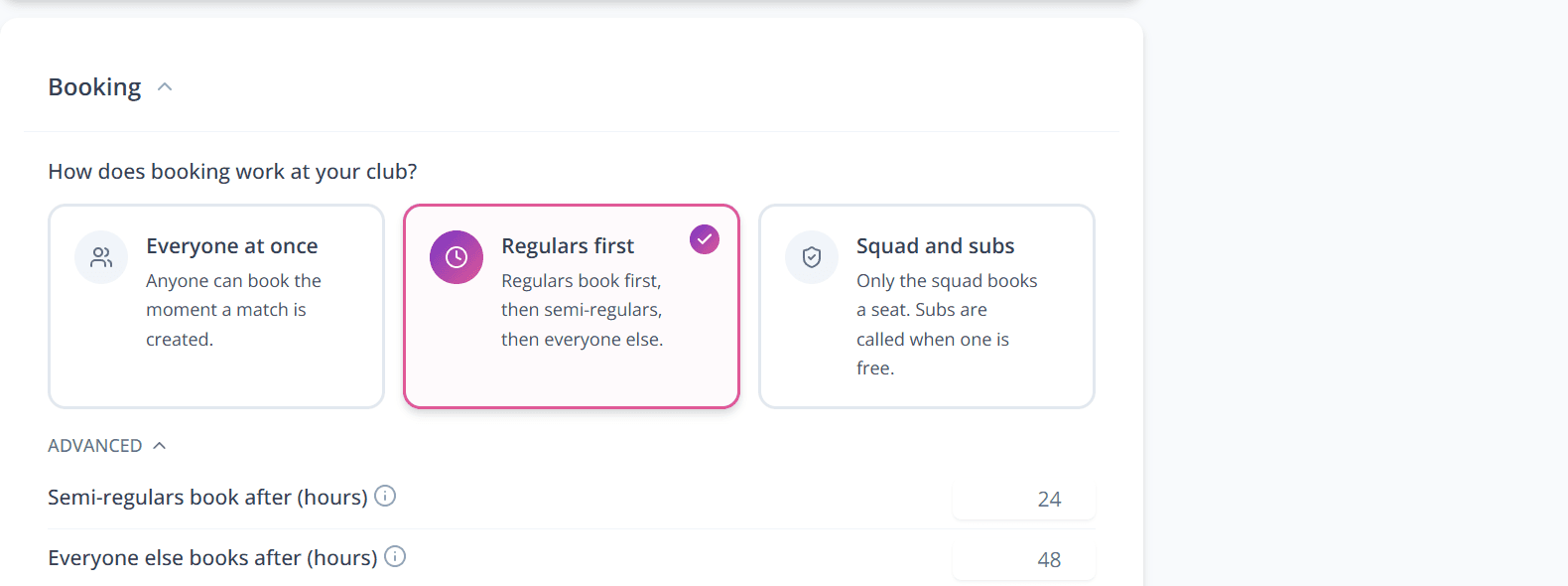
Here's how our own Thursday game runs Regulars first. The booking link goes out on Thursday night, right after the previous game's stats have landed in the group — peak enthusiasm, everyone's just seen the league table move. Regulars (players who pay for a full season) get 24 hours to book before semi-regulars open, and everyone else after that. The people who've committed for the year never miss out to someone who plays twice a summer, and nobody has to police it — the windows do the politics. Want that on a clock you choose? On Booking opens, pick At a set time…. Thursday 9am, with the default 24 and 48 hours, opens semi-regulars on Friday 9am and everyone else on Saturday 9am. Each opening also posts in the club chat.
Setting it up
Pick a card
Mark your regulars
If you're looking for Tier 1, that's Squad (Squad and subs) or Regular (Regulars first).
Create the match
Regulars and other unrestricted players get a push when their window opens, so nobody has to watch the clock. The same moment posts in the club chat. Restricted subs under Squad and subs get none of either. Windows are in club time. Without a kickoff time, Capo treats the game as on that day, so an hour before kickoff lands the evening before. New RSVP matches default to this booking style when you already have Regular or Squad (A) players.
Don't want spaces sitting empty while a window runs out? Turn on Open to the next group once regulars have replied (on Squad and subs: Call subs early once the squad has replied). Once everyone in a group has said in or out and there are still spaces, the next group gets its turn straight away. Anyone who hasn't replied keeps the next group waiting until its usual time.
Priority access, not reserved spots
Squad and subs, end to end
This is the Teamer-style loop: a fixed squad books, and the standby list is called when a spot is free — not blasted every week.
You create the match
Squad tap Book
Subs tap I can play
The sub window opens
Someone drops out, or a late squad booking lands
- •No weekly spam — Subs don't get the booking-open push; they're called when a spot is free
- •One person per empty spot — each offer gets ~20 minutes, shorter as kickoff gets closer; if they don't claim, the next sub is offered. With a kickoff time that follows the real start. Without one, Capo treats the game as on that day
- •Admin view — the waitlist section in Match Control shows the ranked queue
- •Still manual escape hatches — you can promote from the waitlist or add players yourself anytime
Mark your lineup as Squad and your standby list as Subs, then create the match. See Admin Setup for the Advanced knobs (when subs start being called, who to call first, minutes to claim).
Frequent subs are Subs, not a later booking window
Dropouts affect everyone
Auto-Pilot mode
Auto-Pilot is set-and-forget. You create the match and then don't need to touch it until game day. It handles everything:
- •Auto-balance — When the match is full, teams are balanced automatically using your chosen method
- •Auto-send — Teams are shared with players immediately after balancing
- •Dropout recovery — If a player drops out, Auto-Pilot offers the spot to the next person on the waitlist, then rebalances and resends teams automatically
- •Smart timing — Balancing happens when capacity is reached, not before
You can still intervene at any point — unlock the pool, re-balance, or make manual changes. Auto-Pilot just handles the happy path so you don't have to.
Pausing bookings & adding players manually
In RSVP or Auto-Pilot mode, you can pause bookings at any time if you need to temporarily stop players from signing up (e.g., waiting on a venue confirmation).
You can also still add players manually to the pool — useful if someone needs to make up numbers or a player isn't using the app. Manual additions work alongside RSVP bookings.
Tip
Managing capacity
Capacity is set automatically based on team size (e.g., 9v9 = 18 players). If you need more or fewer, edit the match and change the team size.
In RSVP mode, you can't add players beyond capacity — this ensures the match settings match reality. To add more, increase the team size first.
Showing who has responded
By default, players only see who is confirmed for a match. In Setup → Matches, under the RSVP section, enable Show responses on Upcoming match so players can also see who has declined and who is on the waitlist.
This helps reserve players gauge whether a spot might open up — useful for FCFS clubs where regulars often decline late. Some clubs prefer to keep responses private, so the setting is off by default.
The activity feed
The activity feed shows everything that's happened with bookings:
- •Bookings — When someone books in
- •Dropouts — Highlighted in red so you spot them quickly
- •Waitlist changes — Who joined, who got promoted
- •Admin actions — When you added or removed someone manually
It's collapsed by default — tap to expand and see the full history.
Paid bookings
If your group collects match fees, players pay when they book. Payment is required to secure a spot — no more chasing people for money.
- •Payment at booking — Players pay by card, Apple Pay, or Google Pay
- •Instant confirmation — Spot is confirmed as soon as payment completes
- •Pass holders skip payment — Season pass holders book with one tap
- •Refunds when cancelling — Players can cancel anytime and get refunded (minus a small transaction fee)
Tip